Manage Disk Space Intelligently with AI-Powered Analysis

AiCleanDisk Pro is a professional Windows disk space management solution. Its unique AI-powered intelligent analysis engine can deeply clean system redundancies and hard-to-reach temporary files, freeing up additional space. Tests show that it can typically release over 20GB+ of capacity on the C drive, with efficiency far surpassing most tools on the market.

Windows 10/11 32bit/64bit

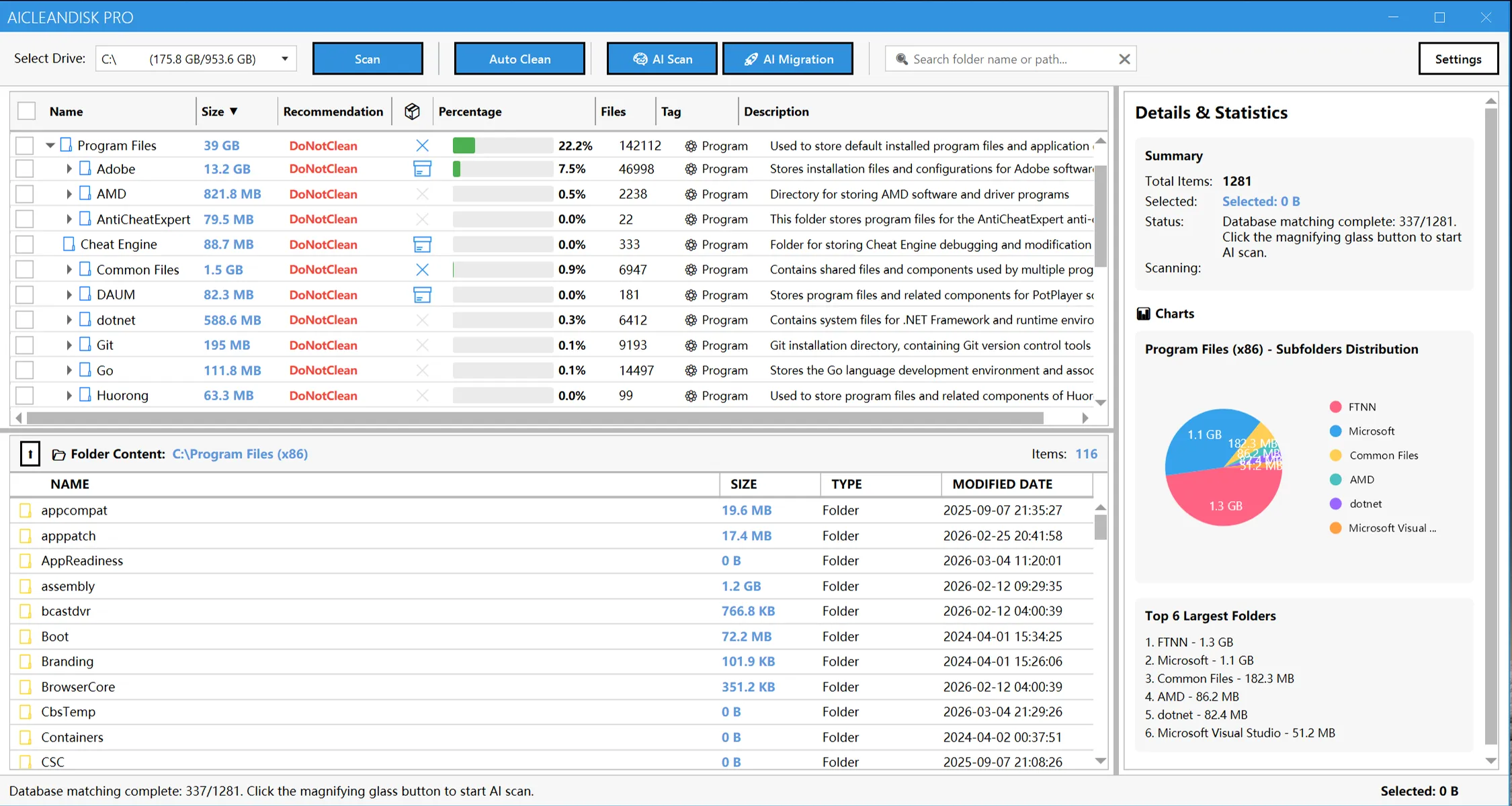
Dashboard Preview BaseDashboard Preview Overlay

Powerful Features for Smarter Disk Management

AiCleanDisk Pro offers AI-powered analysis, quick scanning, automatic cleaning, visual charts and many other powerful features, allowing you to easily monitor disk space usage and quickly free up storage.

AI-Powered Analysis
Automatically identify folder purposes using AI technology, providing precise cleaning recommendations and risk assessment.

Quick Scan Analysis
Scan entire drives or specific directories to quickly gain an in-depth view of your storage and pinpoint the largest space-consuming folders.

Automatic Cleaning
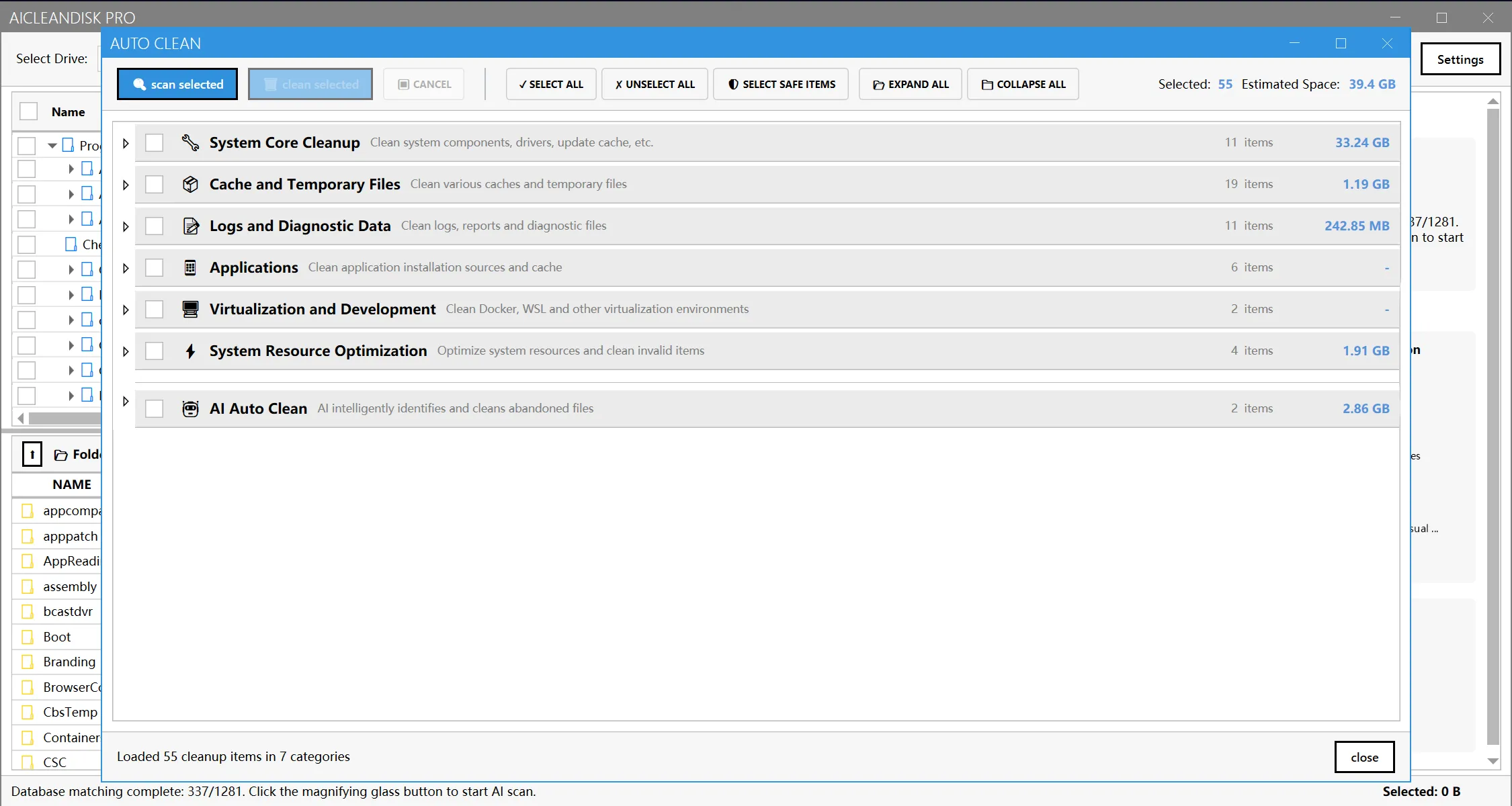
Supports a comprehensive set of 7 major cleaning categories, including system core cleanup, cache files, log reports, and more.

Visual Data Analysis
Pie charts and bar graphs provide an intuitive visual breakdown of your storage space distribution across different folders at a glance.

Smart Folder Migration
AI intelligently identifies large folders on system drive that can be safely migrated to other disks, significantly freeing up system space without risk.

Safe & Reliable
Comprehensive risk assessment mechanism ensures the safety of cleaning operations with preview scanning support.

AiCleanDisk Pro's AI-powered analysis feature helped us quickly identify and clean dozens of GB of temporary files, making disk space management unprecedentedly simple and efficient.
Guillermo Rauch avatar
Zhang Ming
Senior Development Engineer

Pricing Plans for Everyone

From individual users to enterprise teams, we offer flexible pricing plans to meet different users' needs.

Free
$0
Average 6~10GB disk space freed.
Inject new vitality into your system, perfect for all users who want to quickly improve computer performance.
Included Features:
High-speed disk scanning engine: Lightning-fast full disk analysis with intuitive charts to precisely locate large files and redundant directories.
Basic system cleanup: Safely remove system junk, temporary files, and logs to maintain basic system health.
Enhanced visualization & space potential assessment: Clear disk usage analysis and visual cleanup effects.
Professional software cache cleanup: Deep cache rules for professional stack residual files.
Pro Edition
Popular
$2.9
/month
$9.9
Expected to clean 20~40GB or more space
Unlock the full potential of the AI engine, designed for users pursuing ultimate performance and maximum available space.
All Free features, plus:
AI-driven deep scanning & tagging: Exclusive AI engine intelligently identifies folder purposes, provides expert-level cleanup recommendations, and precisely locks onto 'cache dead zones' and 'upgrade residues' that traditional tools cannot find.
Deep junk file cleanup: AI scanning distinguishes independent junk files, upgrade residues, cache residues, and can identify junk files that most cleanup software cannot recognize.
AI lossless application migration: Intelligently identify and migrate large applications or files to other disks, ensuring program functionality remains intact while thoroughly relieving C drive pressure.
Migration insurance & one-click restore: All migration operations automatically create safety backups, support one-click undo anytime or quick recovery after system reinstallation, ensuring data security.
Cloud rule library continuous updates: Our AI cleanup rules and software identification library are updated daily through the cloud, ensuring your cleanup effectiveness is always at its best.

What Our Users Say

Discover how users efficiently manage disk space with AiCleanDisk Pro, quickly free up storage, and improve system performance

My system drive was always full, yet held essential files, ruling out a reinstall. Other cleaners failed, but AiCleanDisk Pro cleared 20GB of hidden temporary files and migrated 60GB via AI. My disk space is now secure. Now my disk space is no longer critical!
Annette Black avatar
Annette Black
Design Studio
As a developer, I regularly need to clear node_modules and temp folders. AiCleanDisk Pro's quick scan feature efficiently pinpoints these large folders, saving me significant time.
Dianne Russell avatar
Dianne Russell
Tech Company
The visual charts are incredibly intuitive, letting me instantly see the biggest space-hogging folders. Its AI labeling and migration feature intelligently and safely relocated 150GB of application files—finally securing my system drive.
Cameron Williamson avatar
Cameron Williamson
Individual User
The automatic cleanup feature supports multiple cleanup categories, from system temp files to browser cache. One-click cleanup is very convenient, and the preview scan lets me confirm the file list before deletion - very safe.
Robert Fox avatar
Robert Fox
Individual User
I tested the free version first, and it's already very powerful. Later I upgraded to Pro and got even more advanced features. The cleanup efficiency has improved significantly.
Darlene Robertson avatar
Darlene Robertson
IT Administrator
AiCleanDisk Pro's interface design is modern and the operation is simple and intuitive. Even users who aren't very technical can easily use it to quickly free up disk space.
Cody Fisher avatar
Cody Fisher
Regular User
AiCleanDisk Pro's AI analysis accurately identifies folder uses and recommends safe deletions. It cleared over 50GB of temporary files and caches, and relocated hundreds of GB of software folders, significantly boosting performance and maximizing space—all without a reinstall system.
Albert Flores avatar
Albert Flores
Enterprise IT

Frequently Asked Questions

Learn how AiCleanDisk Pro helps you efficiently manage disk space and quickly free up storage

What is AiCleanDisk Pro? Who is it suitable for?
AiCleanDisk Pro is a professional Windows disk space management and cleaning tool that integrates AI-powered analysis, automatic cleaning, visual analytics, and many other powerful features. It can deeply clean system redundancy and hard-to-reach temporary files, averaging over 20GB or more of space freed on C drive. The developer personally experienced this problem and tried most cleaning software on the market without satisfactory results. This tool can clean most dead-end files while transferring C drive space, freeing you from space shortage troubles.
How does the AI-powered analysis feature work?
AI-powered analysis uses LLM to automatically identify folder purposes and types, providing detailed cleaning recommendations and risk assessments for each folder. The system prioritizes using local databases to quickly match known folder patterns (45+ predefined patterns). AI can intelligently decide whether to explore subfolders deeply, avoiding unnecessary analysis.
What cleanup categories does the automatic cleaning feature support?
AiCleanDisk Pro supports 7 major cleanup categories: system core cleanup (Windows update files, system restore points, etc.), cache and temporary files, log reports and diagnostic data, application-related files, virtualization and development environments, system resource optimization, and intelligent cleanup recommendations based on AI analysis results. Each cleanup item has clear risk level assessment and supports preview scanning and batch cleanup.
What features are included in the free version?
The free version includes basic disk scanning analysis, disk space migration, smart folder migration tagging, visualization charts, temporary/cache file cleanup and other core features, suitable for personal users' daily use. You can first use the free version to experience the product features, then upgrade to Pro version as needed to get more advanced features.
Does AI scanning involve user privacy?
No. This tool does not scan user privacy directories, nor does it cache or upload related information. Rest assured, the core of AI scanning is to identify file types and expiration times, not content. All analysis and cleanup are completed locally on your computer. The algorithm has built-in strict privacy directory whitelists, never touching personal documents, photos and other sensitive areas, and will not upload any data.
Is using AiCleanDisk Pro safe?
Absolutely safe. AiCleanDisk Pro uses a comprehensive risk assessment mechanism, with each cleanup item having clear risk level identification. You can preview the list of files to be deleted before cleanup, ensuring no important files are accidentally deleted. The system also supports secure file deletion to prevent data recovery.

Clean Your Disk Space Intelligently

Download AiCleanDisk Pro now and experience AI-powered analysis, quick scanning, automatic cleaning, and many other powerful features to easily manage disk space and quickly free up storage.